
AI sketches the rough.
You make it yours.
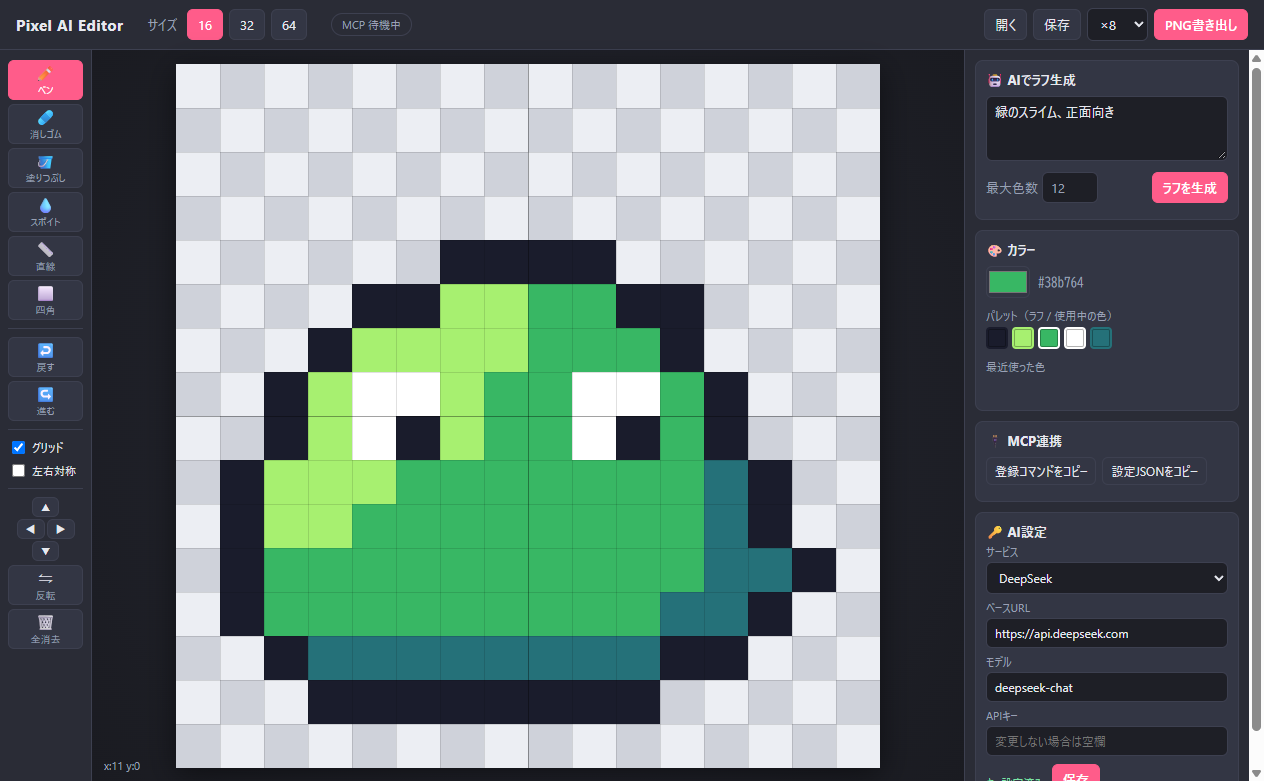
A pixel art editor for 16×16, 32×32 and 64×64 sprites. Describe what you want, let AI draw a first draft, then refine every pixel by hand. Any AI agent that speaks MCP can draw on the canvas too.
Windows 10/11 (x64) · Free · MIT license · AI features need an API key from your chosen service (local LLMs need none) · The app UI is currently in Japanese
Features
Let AI handle the first sketch. Spend your time on the details that matter.
AI rough drafts
Type “a small knight holding a blue sword” and get a sprite at your chosen size and color count, right on the canvas.
Bring your own AI
DeepSeek, OpenAI, Claude, Gemini, OpenRouter, Ollama, LM Studio, or any OpenAI-compatible API.
Full editing toolkit
Pen, eraser, fill, eyedropper, line, rectangle, mirror drawing, flip, shift, and undo/redo.
Tracing mode
Show the AI draft as a semi-transparent underlay and redraw it in your own linework.
MCP server built in
Claude, Cursor, VS Code and other MCP clients can draw, inspect and export — live in the running app.
Your keys stay local
API keys are stored only on your PC. The app talks only to the AI service you pick.
Get started
From install to your first sprite in a few minutes.
- Download and run the installerGet
Pixel-AI-Editor-Setup-x.y.z.exefrom Releases. The installer is unsigned, so if SmartScreen warns you, click “More info” → “Run anyway”. - Pick an AI service and add your keyIn the “AI設定” (AI settings) panel at the bottom right, choose a service, paste your API key and save. Local servers like Ollama need no key.
- Choose a size and describe your spritePick 16, 32 or 64, type a prompt and press “ラフを生成” (Generate). The draft lands on the canvas in seconds to a minute.
- Refine and exportFix whatever you like, then press “PNG書き出し” (Export PNG) at 1×, 8× or 16×. Ctrl+Z always takes you back.
Let your AI agent draw (MCP)
The “MCP連携” panel copies a ready-made config for your PC. The installed app runs the MCP server itself — no Node.js needed.
# Most clients (Claude Desktop, Cursor, Windsurf, Gemini CLI…)
{
  "mcpServers": {
    "pixel-editor": {
      "command": "...\\Pixel AI Editor.exe",
      "args": ["...\\mcp-server.mjs"],
      "env": { "ELECTRON_RUN_AS_NODE": "1" }
    }
  }
}

# Then just ask
> Draw a 32×32 treasure chest. Check it,
  then add shading to finish it.
The agent paints whole sprites as a text grid, looks at the result with get_canvas (PNG + grid), and polishes it. Everything appears live in the editor, where you can keep editing and undo step by step.
open_editorget_canvasnew_canvasdraw_rowsset_pixelsfilldraw_linedraw_rectclear_canvasundoredogenerate_roughexport_png